
It’s the first week of school. Your phones are ringing, your inbox is full, and your small support team is answering the same question for the 400th time: “How do I reset my password?”
You don’t have a technology problem. You have a volume and routing problem. The question isn’t whether to replace your helpdesk with AI, but which requests should never need a human at all.
This guide gives you a practical framework for deciding.
AI Assistant vs. Traditional Helpdesk
A K-12 AI assistant is a chatbot trained on your school’s own content, such as policies, FAQs, calendars, and knowledge base articles. It answers common questions instantly, around the clock, and in multiple languages. A traditional helpdesk relies on staff working tickets, phones, and email during business hours.
The best schools don’t pick one. They use AI for high-volume, repeatable questions and keep people for complex, sensitive, or hands-on issues.
Why Traditional Helpdesks Struggle in K-12
Education support is structurally harder than corporate IT. You serve parents, students, teachers, and administrators, each with different needs, across dozens of buildings, with a lean team.
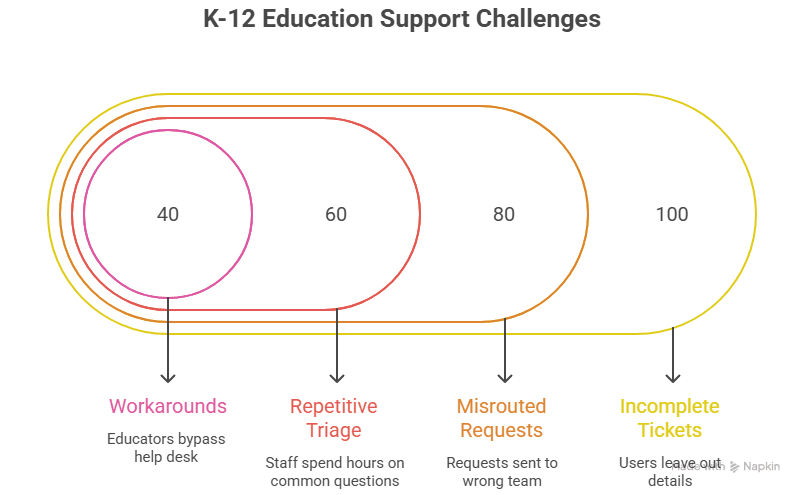
Administrators rely on district-wide reporting and compliance tools, while teachers need quick fixes to prevent disruptions during lessons. That mix creates predictable friction:
- Incomplete tickets. Users leave out the details technicians need, which causes back-and-forth.
- Misrouted requests. A transportation question lands in IT, or an enrollment question lands with the front office.
- Repetitive triage. Staff spend hours on questions that already have written answers.
- Workarounds. Over time, many educators bypass the help desk altogether, fixing issues themselves or swapping devices informally. The district then loses visibility into recurring problems.
Seasonal spikes make it worse. Back-to-school, enrollment windows, testing, and snow days all produce surges that a fixed-size team can’t absorb, and a bigger team isn’t an efficient answer to a few peak weeks.
What the Data Says About AI in K-12 Support
Most published figures come from vendors, so treat them as directional rather than guaranteed. Still, the pattern is consistent:
- One industry roundup reports that AI systems can reduce ticket resolution times from 5 days to 1 day, and districts using AI workflows save 35+ minutes per ticket.
- One vendor estimates that AI agents resolve 60-70% of Tier-1 help desk tickets automatically. That is a vendor projection, so benchmark it against your own ticket data.
- The market is moving fast. In February 2026, Incident IQ introduced its AI Ticket Assistant for K-12, serving over 14 million students across 2,000 schools.
- Large Schools are adopting it too. Palm Beach County’s IT division, which supports one of the largest school districts in the country, notes it is introducing chatbot and AI capabilities to better assist stakeholders.
What this means for you: Don’t buy on headline percentages. Audit your own tickets first. Your top 20 repeat questions are where the savings are.
The Automation Decision Framework
Score every request type on three questions:
- Is the answer the same every time? (Repeatable)
- Does the answer already exist in writing? (Documented)
- Is the cost of a wrong answer low? (Low risk)
Three “yes” answers mean automate. A “no” on any one means assist or keep human.
Automate These (AI Assistant First)
| Request type | Why it works |
|---|---|
| Password reset instructions and login help | High volume, fixed steps |
| School calendars, bell schedules, holidays | Public, documented |
| Enrollment and registration FAQs | Seasonal spikes, same questions |
| Bus routes and transportation basics | High-frequency parent questions |
| Meal programs and menus | Repetitive and low risk |
| "How do I…" device, Wi-Fi, and app guidance | Documented and step-by-step |
| Policy lookups (dress code, attendance) | Answer lives in the handbook |
| After-hours and multilingual questions | Humans aren't available or aren't scalable |
Automate the Front End, Keep a Human for Resolution
- Ticket intake and triage. AI collects the details, categorizes the issue, and routes it correctly. A technician fixes it.
- Account and access issues. AI verifies and gathers information. Staff approves changes.
- Hardware faults. AI walks through troubleshooting. If that fails, it creates a complete ticket.
This hybrid tier is often where the biggest gains sit. As one industry guide puts it, the sources of help-desk friction are incomplete requests, misrouted tickets, repetitive triage, and constant interruptions. AI handles those without replacing the technician.
Keep Human-Led
- Student safety, discipline, or welfare concerns
- Special education, IEP, and 504 conversations
- Custody, legal, and sensitive family situations
- Complaints from upset parents
- Anything involving individual student records, unless the system is properly authenticated
Rule of thumb: AI should handle the question, not the crisis.
Head-to-Head: AI Assistant vs. Traditional Helpdesk
| Factor | K12 AI Assistant | Traditional Helpdesk |
|---|---|---|
| Availability | 24/7/365 | Business hours |
| Response time | Instant | Minutes to days |
| Scalability | Handles surges without added staff | Needs more people |
| Languages | Multilingual | Limited by staff |
| Empathy and judgment | Limited | Strong |
| Complex troubleshooting | Escalates | Resolves |
| Cost pattern | Mostly fixed | Scales with volume |
| Consistency | Same answer every time | Varies by agent |
Neither column wins outright. The goal is to put each request in the right column.
The Risks to Manage
Skeptical districts have good reasons for caution. Address these before launch:
- Hallucinations (made-up answers). Choose an assistant that answers only from your approved content and shows its sources. Some K-12 vendors position this as a core feature: the chatbot is powered by your data, so it can only answer questions with information the district provides.
- Student data privacy. Confirm FERPA alignment, data retention rules, and whether student data is used to train third-party models. Ask where data is stored and who can access it.
- Bad escalation. The worst experience is a chatbot that traps people. Require a clear hand-off to a person, with the conversation history attached.
- Stale content. An AI assistant is only as accurate as your knowledge base. Assign an owner and review the content on a schedule.
- Equity and access. Support multiple languages and make sure families without smartphones can still reach a human.
A 5-Step Rollout Plan
- Audit your tickets and inbound questions. Pull 60 to 90 days of data. Rank by volume and identify your top 20 repeat questions.
- Clean your source content. Update FAQs, policies, and web pages. Remove outdated PDFs. This step determines your accuracy.
- Start small. Pilot one or two use cases, such as staff IT questions or enrollment FAQs, at a limited number of schools.
- Define escalation rules. Decide what the AI must hand off, to whom, and how fast.
- Measure and expand. Track containment rate (resolved without a human), time to resolution, escalation rate, satisfaction, and staff hours saved. Add use cases only after the first ones perform.
Pro tip: A free 6-month trial removes the budget barrier. Maisters SchoolAssist™ covers up to 100 webpages or 500MB of content, which is enough for your top FAQs, enrollment pages, and IT help articles.
Mistakes to Avoid
- Automating before cleaning your content. This produces confident but wrong answers.
- Treating AI as a headcount cut. Position it as capacity that frees your team for higher-value work, such as proactive maintenance, device lifecycle planning, and training.
- Skipping stakeholder input. Involve teachers, front-office staff, and parents early.
- Measuring only deflection. A deflected ticket that wasn’t resolved is a failure.
- Waiting for a big budget approval. You can validate results first. Start with a free 6-month trial and use your own data to build the business case.
So, What Should Your District Automate?
Start with the high-volume, documented, low-risk questions that currently consume your team’s day. Use AI to improve intake and routing for everything else. Keep people for judgment, empathy, and complex fixes.
If you’re ready to see what that looks like in practice, explore AI Chatbot for K-12 from App Maisters Government. It is designed to help districts give students, parents, and staff instant answers while keeping your team focused on the work that needs a human.
Frequently Asked Questions
What is a K-12 AI assistant?
A K12 AI assistant is a chatbot trained on a school’s own content, such as policies, calendars, FAQs, and knowledge base articles. It gives students, parents, and staff instant answers 24/7, often in multiple languages, and hands off to a person when a question needs human judgment.
Is there a free trial for a K-12 chatbot?
Yes. Maisters SchoolAssist™ offers a 6-month free trial that includes a branded AI assistant trained on your website content, covering up to 100 webpages or 500MB. There are no setup fees and no credit card is required.
How is an AI chatbot different from a traditional school helpdesk?
A traditional helpdesk relies on staff working tickets, phones, and email during business hours. An AI chatbot answers repeatable questions instantly at any hour and scales during busy periods without extra staff. The helpdesk still handles complex, sensitive, and hands-on issues.
What should a school district automate with AI first?
Start with high-volume questions that already have a written answer: password reset steps, enrollment and registration, school calendars, bus routes, meal programs, and policy lookups. These are repeatable and low risk, so they deliver savings quickly with the least chance of a harmful mistake.
Will an AI assistant replace school IT or front-office staff?
No. It takes over repetitive Tier-1 questions so staff can spend time on complex troubleshooting, student support, and proactive projects. Most districts treat AI as added capacity rather than a way to cut headcount.
Is an AI chatbot safe and FERPA-compliant for student data?
It can be, if it’s built for K-12 and configured properly. Before buying, confirm how student data is stored, who can access it, how long it’s kept, and whether it’s used to train outside AI models. Also ask for a written statement of FERPA alignment.
How do you stop a school chatbot from giving wrong answers?
Limit the assistant to your district’s approved content, require it to show its sources, and set clear rules for escalating to a human. Review and update the knowledge base on a regular schedule, since outdated source material is the main cause of inaccurate answers.