A resident wants to pay a water bill, report a pothole, or check the status of a permit. They pull out their phone, not a laptop, and land on a government website that wasn’t built for that screen. The page won’t load properly, the form times out, and after three failed attempts, they give up and call the office instead, adding another ticket to an already-backed-up queue.
This scene repeats itself thousands of times a day across counties, cities, and state agencies. Nearly all Americans now carry a smartphone, and the majority actively prefer using a mobile app to interact with government over any other channel. Yet a large share of public-sector websites still treat mobile as an afterthought rather than the primary front door to civic services.
For IT directors, city administrators, and digital government leaders, this isn’t a cosmetic problem; it’s an operational one. Missed permit deadlines, delayed inspections, clogged call centers, and eroding public trust all trace back to the same root cause: agencies that haven’t modernized how citizens and field staff actually reach them. This guide breaks down the mobile app features that matter most in 2026, the technology powering them, and how to implement them without blowing up your budget or your legacy IT stack.
Key Challenges Government Agencies Face Today
Before looking at solutions, it’s worth naming the problems clearly:
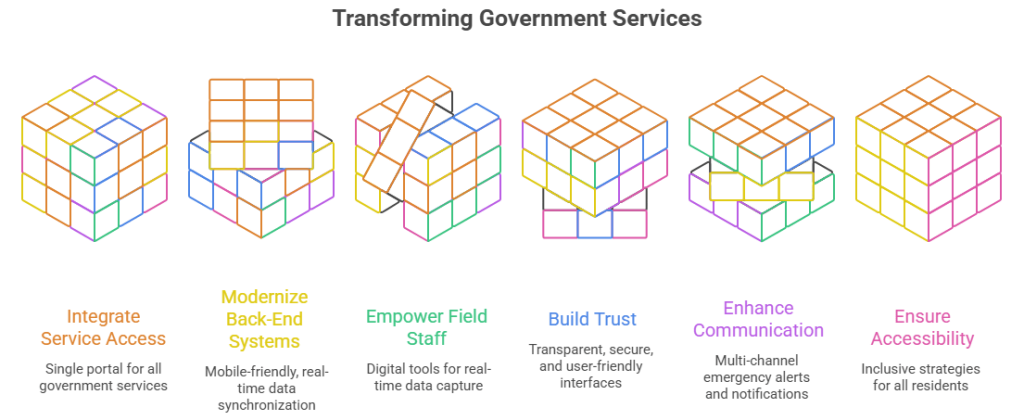
- Fragmented service access: Permits, payments, service requests, and alerts often live on separate portals, forcing residents to juggle multiple logins.
- Legacy back-end systems: Many agencies run mobile-unfriendly, decades-old systems that make real-time data sync nearly impossible.
- Field staff working blind: Inspectors, code enforcement officers, and public works crews frequently rely on paper forms or disconnected tools, slowing turnaround times.
- Trust deficits: Years of data breaches and confusing bureaucratic interfaces have made residents wary of sharing information through digital channels.
- Emergency communication gaps: Agencies still leaning on broadcast TV or physical signage struggle to reach people fast during floods, storms, or public safety incidents.
- Accessibility and inclusion shortfalls: Seniors, non-English speakers, and residents with disabilities are often left out of “digital-first” strategies.
These aren’t abstract IT issues; they show up as lower approval ratings, missed compliance deadlines, and overwhelmed customer service lines.
Why Mobile Matters More Than Ever for Government Agencies
Public expectations have caught up with private-sector convenience. People bank, shop, and manage healthcare from their phones, and they now expect the same from their local DMV, permitting office, or utility department. Recent government mobile app adoption trends show steadily rising usage of self-service portals, push notifications for public alerts, and mobile-first payment systems across city, county, and state agencies.
This isn’t a nice-to-have anymore. It’s infrastructure. A well-built app reduces call center volume, speeds up service delivery, and perhaps most importantly, rebuilds public trust in institutions that are too often seen as slow and outdated.
1. Self-Service Citizen Portals
The single biggest driver of app adoption is the ability to complete a task without human intervention. Citizens want to:
- Renew licenses and permits
- Pay taxes, fines, and utility bills
- Check the status of an application or request
- Submit documents securely
A strong self-service portal cuts down on phone calls, walk-ins, and paperwork backlogs. It also gives staff more time to handle complex cases instead of repetitive administrative work. This is one of the core reasons agencies invest in government app development in the first place; the ROI shows up almost immediately in reduced operational load.
2. Real-Time Push Notifications and Public Alerts
Whether it’s a weather emergency, a road closure, a public health advisory, or a reminder that a permit is expiring, real-time notifications keep citizens informed without them having to check a website. In 2026, agencies are moving beyond generic blast alerts toward segmented notifications, sending relevant updates based on location, service history, or user-selected preferences. This makes communication feel personal instead of noisy, which keeps people from disabling notifications altogether.
3. Mobile-First Forms and Digital Document Submission
Long, clunky, desktop-designed forms are one of the biggest reasons citizens abandon government processes halfway through. Mobile-optimized forms with auto-save, progress indicators, e-signatures, and camera-based document uploads (think: snapping a photo of a utility bill for proof of address) dramatically improve completion rates. Accessibility matters here too; forms need to work smoothly for users with disabilities, older adults, and non-native English speakers alike.
4. Secure Digital Identity and Authentication
As more services move online, identity verification becomes critical. Citizens need confidence that their personal data, tax records, health information, and benefits status are protected. Features like biometric login, multi-factor authentication, and single sign-on across multiple agency services reduce friction while maintaining strong security standards. This is especially important as more agencies interconnect their systems and share verified identity credentials across departments.
5. GIS and Location-Based Services
Mapping and geolocation features have become essential for everything from finding the nearest polling location to reporting a downed tree branch. Interactive maps let citizens visually pinpoint issues, view zoning information, or locate public services nearby. For internal operations, location data also helps agencies route field staff efficiently and respond to citizen reports faster.
6. Field Inspection and Workforce Management Tools
Mobile isn’t only for citizens; it’s transforming how government employees work in the field. A government mobile inspection app allows building inspectors, code enforcement officers, and public works crews to complete checklists, capture photos, log GPS-tagged data, and file reports directly from a job site instead of returning to the office to do paperwork. This dramatically shortens turnaround times, reduces data entry errors, and gives supervisors real-time visibility into field operations. Offline functionality is a must here, since many inspections happen in areas with spotty connectivity.
7. Multilingual and Accessibility-First Design
Government services exist for everyone, and that means apps need to meet WCAG accessibility standards and support multiple languages out of the box, not as an afterthought. Screen reader compatibility, adjustable text sizing, high-contrast modes, and voice navigation aren’t optional extras in 2026; they’re baseline requirements for serving diverse communities equitably and staying compliant with federal and state accessibility mandates.
8. Integrated Payment Systems
Whether it’s parking tickets, property taxes, or recreation program fees, citizens expect to pay directly within the app using debit, credit, or digital wallets like Apple Pay and Google Pay. A smooth, PCI-compliant payment flow without redirecting users to a clunky third-party portal reduces abandoned transactions and speeds up revenue collection for the agency.
9. Two-Way Communication and Feedback Channels
Modern government apps aren’t just broadcast tools; they’re conversation tools. In-app chat support, ticket tracking for service requests (like “report a pothole” or “report graffiti”), and satisfaction surveys give agencies a direct feedback loop with the community. This visibility helps departments prioritize resources based on actual citizen needs rather than guesswork.
10. Data Dashboards and Transparency Features
Public trust grows when government is transparent about how it operates. Features like open budget dashboards, crime statistics maps, permit approval timelines, and project status trackers let citizens see what’s happening behind the scenes. This kind of transparency doesn’t just look good; it actively reduces the volume of “what’s the status of X” inquiries flooding staff inboxes.
Emerging Tech Trends Solving the Problem
Several converging trends are reshaping what a good government app looks like in 2026:
| Trend | What It Solves |
|---|---|
| AI-powered chatbots & virtual assistants | Deflects routine questions, available 24/7, cuts call center volume |
| Progressive Web Apps (PWAs) | Delivers app-like speed without requiring an app-store download, ideal for low-storage or low-connectivity devices |
| Cloud-native, API-first architecture | Connects permitting, payments, and inspections into one unified experience |
| Predictive/personalized notifications | Proactively reminds residents about license renewals or nearby meetings based on relevance, not blanket blasts |
| Biometric and touchless authentication | Speeds up secure logins while meeting accessibility needs |
| Real-time GIS and mapping | Lets field staff and residents see live status of service requests, road closures, or inspection routes |
Analysts tracking public-sector IT spending report that a majority of government technology leaders plan to increase investment in citizen-experience tools like mobile apps and digital portals through 2026, and cities piloting AI-based personalization in their digital services have seen measurable jumps in resident engagement. The direction is clear: mobile is no longer a “nice to have” channel; it’s becoming the primary channel.
Real-World Use Cases
Unified county service portals: Several counties have replaced separate permit, payment, and service-request systems with a single app that also pushes inspection schedules and alerts directly to residents and field staff, cutting down on missed appointments and duplicate paperwork.
AI-assisted citizen support: Public-sector chatbot deployments have moved well past simple FAQ bots, now handling multi-step tasks like guiding a resident through a permit application or explaining why a request is delayed.
Faster field inspections: Agencies that digitized inspection workflows with mobile tools have reported dramatically shorter service times, with one city seeing citizen satisfaction climb sharply after launching a user-friendly mobile service app.
Federal-scale mobile modernization: Larger federal efforts to simplify health and benefits tools for veterans, and mobile-responsive redesigns of major citizen-facing sites, have driven double-digit gains in customer satisfaction scores proof that mobile investment pays off at every level of government.
These examples reflect a broader shift documented in current government mobile app adoption trends, where mobile is increasingly treated as core infrastructure rather than a side project.
Best Practices & Expert Recommendations
- Start with the highest-friction service: Whether it’s permits, code enforcement, or utility payments, fix the process residents complain about most first.
- Design mobile-first, not mobile-adapted: Retrofitting a desktop portal rarely performs as well as building for the smaller screen from the start.
- Make data transparency part of the UX: Show residents exactly where their request stands; trust grows when the process isn’t a black box.
- Invest in offline resilience: Field apps must function in basements, rural areas, and disaster zones with no signal.
- Treat every alert as opt-in and relevant: Over-notifying residents kills engagement faster than under-notifying them.
- Budget for maintenance, not just launch: Government IT contractors often see agencies underfund post-launch support, which is where most long-term adoption problems originate.
If your team is still weighing whether this investment is worth it, it helps to revisit the core reasons local government needs mobile apps: faster service delivery, reduced call-center load, better compliance tracking, and increasingly resident expectations that simply won’t accept anything less.
Common Mistakes to Avoid
- Launching a mobile app without fixing back-end data silos, the app looks modern but still runs on outdated processes.
- Ignoring field staff needs in favor of only public-facing features, leaving inspectors stuck with paper forms.
- Skipping accessibility testing, which excludes a meaningful share of residents and creates legal risk.
- Over-promising AI capabilities before the underlying knowledge base and workflows are solid.
- Treating the app as a one-time project instead of an ongoing service that needs updates, security patches, and user feedback loops.
Conclusion: What's Next for Government Mobile Apps
By 2026, mobile isn’t a channel governments are testing; it’s the channel residents expect by default. The agencies pulling ahead are the ones treating mobile app strategy as core infrastructure: unifying services, modernizing back-end systems, equipping field teams, and layering in AI where it genuinely reduces friction rather than adding noise.
Looking forward, expect deeper integration between predictive analytics and service delivery apps that don’t just respond to requests but anticipate them, from flagging an expiring license before a resident notices to rerouting inspection schedules based on real-time weather data. Agencies that start building this foundation now, rather than reacting later, will be the ones citizens trust and actually use.
Ready to modernize your agency’s mobile presence? App Maisters Government specializes in building citizen portals, field inspection tools, and AI-driven service platforms for local and state government, helping agencies of every size move from legacy systems to mobile-first service delivery.
Frequently Asked Questions
How much does it cost to build a government mobile app?
Costs vary widely based on scope. A basic citizen-service app (bill pay, service requests, alerts) can start in the low tens of thousands, while a full unified portal with permitting, inspections, and AI chat support can run into six figures. Many agencies reduce upfront cost by starting with a PWA (Progressive Web App) and expanding features over time rather than launching everything at once.
Do we need a native app, or is a mobile-friendly website enough?
For most agencies, a Progressive Web App is the better starting point; it works across devices without requiring an app-store download, is cheaper to maintain, and still delivers app-like speed and offline features. Native apps make more sense when you need deep hardware access, like GPS-based field inspections or push notifications tied to device-level permissions.
How do we get residents to actually download and use the app?
Adoption depends more on solving a real problem than on marketing. Agencies that lead with high-friction services permit status, bill pay, pothole reporting see faster uptake than those launching a general-purpose “everything app.” Promoting the app at the point of an existing pain point (a bill notice, a permit office visit) works better than a generic city-wide announcement.
Is it safe to handle payments and personal data through a government app?
Yes, when built correctly. Agencies should use PCI-compliant payment processors, encrypt data in transit and at rest, and be transparent with residents about what’s collected and why. Trust is rebuilt through visible security practices and clear status updates, not just backend compliance that residents never see.
Can small towns or counties with limited IT budgets afford this kind of modernization?
Yes, many vendors now offer modular, subscription-based platforms instead of custom-built systems, letting smaller agencies start with one feature (like a service-request portal) and add modules like inspections or payments later. This avoids the large upfront investment that used to make mobile modernization feel out of reach for smaller municipalities.
What's the difference between a citizen-facing app and a government mobile inspection app?
A citizen-facing app focuses on residents’ bill pay, permit applications, alerts, and service requests. A government mobile inspection app is built for internal field staff, supporting offline form-filling, GPS-tagged photos, and digital sign-off during site visits. The two are increasingly integrated into one platform so that when an inspector updates a status in the field, the resident sees the change in real time on their end.