
Picture a resident using a screen reader trying to renew a business license on a county website. The form has no labels, the “submit” button is unreachable by keyboard, and a CAPTCHA blocks the page entirely. They give up. Multiply that moment across every county, school district, and state agency in the country, and you get a sobering reality: a large share of people who try to use government services online never finish the task, not from lack of motivation, but because the digital door is locked.
For IT directors, ADA coordinators, and school district administrators, this isn’t a hypothetical anymore. The Department of Justice’s Title II rule under the Americans with Disabilities Act now legally requires state and local governments, including public school systems, to make their websites and mobile apps accessible. The technical bar is the Web Content Accessibility Guidelines (WCAG), and understanding where WCAG 2.1 ends and WCAG 2.2 begins is the difference between agencies that build for the next decade and agencies that are remediating again next year.
Key Challenges Facing Government Agencies Today
- The compliance deadline is real, and it moved: DOJ’s original Title II rule set compliance dates of April 2026 and April 2027 based on population size. In April 2026, DOJ issued an interim final rule pushing those dates to April 26, 2027, for entities serving populations of 50,000 or more, and April 26, 2028, for smaller entities and special districts. The extension gives agencies breathing room, but it does not change the underlying legal obligation, which has existed since 1992.
- Legacy CMS platforms weren’t built for accessibility: Many municipal and school district sites still run on decade-old content management systems with templates that predate modern accessibility standards, making structural fixes harder than a simple settings change.
- Budget and staffing constraints: Most agencies don’t have a dedicated accessibility engineer. Remediation competes with cybersecurity, cloud migration, and every other IT priority on a flat budget.
- Education portals carry extra weight: K-12 districts manage gradebooks, enrollment portals, special education forms, and parent communication tools, each a separate accessibility surface, often built by different vendors with no shared standard.
- Confusion between WCAG versions: DOJ’s rule legally references WCAG 2.1 Level AA, but WCAG 2.2 (published by the W3C in October 2023) is the current, more rigorous standard. Agencies that build only to the legal minimum risk falling behind almost immediately.
What is ADA and WCAG 2.2?
The Americans with Disabilities Act (ADA) is a U.S. civil rights law passed in 1990 that prohibits discrimination against people with disabilities across employment, public services, and public accommodations. Title II of the ADA applies specifically to state and local government entities, and the Department of Justice has clarified that this obligation extends to digital services, meaning a government website or app that’s inaccessible to someone using a screen reader, keyboard-only navigation, or other assistive technology can be treated the same as a building with no wheelchair ramp.
WCAG (Web Content Accessibility Guidelines) is the technical standard that defines what “accessible” actually means in practice. Published by the World Wide Web Consortium (W3C), WCAG is organized around four principles: content should be Perceivable, Operable, Understandable, and Robust, and broken into measurable success criteria at three conformance levels (A, AA, AAA), with AA being the commonly required benchmark. WCAG 2.2, released in October 2023, is the most current version of the standard. It builds on WCAG 2.1 by adding new success criteria focused on areas the earlier version didn’t fully address, things like clearer keyboard focus indicators, larger touch targets for users with motor impairments, login methods that don’t rely purely on memory or puzzle-solving, and not making users re-enter information they’ve already provided. In short, ADA is the law that creates the obligation, and WCAG is the technical rulebook agencies use to actually meet it.
What's New in WCAG 2.2, And Why It Matters
WCAG 2.2 doesn’t replace 2.1; it builds on it, adding criteria that address gaps the older standard missed, particularly around cognitive disabilities, mobile interactions, and login security.
| WCAG 2.2 Addition | What It Requires | Why It's Relevant to Agencies |
|---|---|---|
| Focus Appearance | Visible, high-contrast focus indicators for keyboard users | Citizens navigating forms without a mouse can see exactly where they are |
| Dragging Movements | Any drag-based action must have a non-drag alternative | Map tools, sliders, and file uploads on permit portals |
| Target Size (Minimum) | Clickable elements sized for users with motor impairments | Mobile-first municipal apps and touchscreen kiosks |
| Consistent Help | Help/contact options appear in the same place across pages | Multi-step benefits or tax filing applications |
| Redundant Entry | Don't make users re-enter information already provided | Multi-page school enrollment or licensing forms |
| Accessible Authentication | Logins can't rely solely on memory-based puzzles (e.g., CAPTCHA) | Parent portals, resident accounts, employee self-service |
Building to WCAG 2.2 AA rather than stopping at 2.1 future-proofs an agency’s digital properties against the next regulatory cycle and it’s increasingly treated as best practice even where 2.1 remains the legal text.
Emerging Tech Trends Shaping Accessible Government Web Design
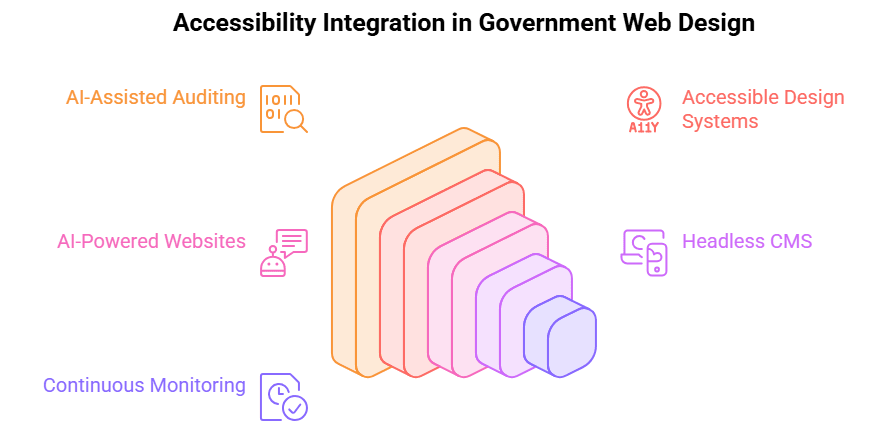
Several forces are converging to make compliance more achievable than it was even two years ago:
- AI-assisted auditing: Automated scanners now catch a meaningful share of common WCAG violations, such as missing alt text, poor color contrast, and unlabeled form fields in minutes rather than weeks of manual review, giving teams a prioritized starting point.
- Component-based, accessible-by-default design systems: Government-specific frameworks like the U.S. Web Design System (USWDS) ship with WCAG-conformant components out of the box, reducing the burden on individual agency dev teams.
- AI-powered accessible municipal websites: Conversational AI and chatbot interfaces, when properly built, allow residents to complete tasks paying a bill, checking permit status, through accessible, screen-reader-friendly natural language interaction instead of navigating a maze of nested menus.
- Headless CMS architecture: Decoupling content from presentation lets agencies update accessibility-compliant front-end templates without touching the underlying data layer or retraining content staff.
- Continuous monitoring over one-time audits: Leading agencies are shifting from annual accessibility audits to automated, ongoing scanning integrated into their deployment pipeline, catching regressions before they go live.
These shifts are also reshaping broader municipal website design trends accessibility is no longer a final QA checkbox, but a design constraint baked in from wireframe to launch.
Step-by-Step: How Agencies Should Approach WCAG 2.2 Compliance
- Run a full accessibility audit now: Combine automated scanning tools (axe, WAVE, Siteimprove) with manual testing by actual screen reader and keyboard-only users. Automated tools alone catch roughly 30–40% of issues; human testing finds the rest.
- Map findings against both WCAG 2.1 AA and 2.2 AA: Triage by severity and by which pages carry the highest traffic or legal risk payment portals, forms, and emergency notices first.
- Fix structural issues before cosmetic ones: Heading hierarchy, form labels, keyboard navigation, and focus order should be remediated before color and font tweaks.
- Adopt an accessible design system or rebuild on a modern, compliant CMS: This is often the moment agencies choose to invest in professional government web development services rather than patch an aging platform indefinitely.
- Train content authors, not just developers: A perfectly accessible template can still be broken by a staff member uploading an unlabeled PDF or an image with no alt text.
- Build a documented accessibility policy and feedback mechanism: DOJ’s rule expects an ongoing process, not a one-time fix, including a clear way for residents to report barriers.
- Re-test on every release: Bake automated accessibility checks into your CI/CD pipeline so new features can’t ship non-compliant.
Real-World Use Cases
County tax and licensing portal: A mid-size county replaced a 12-year-old PDF-based permit system with a WCAG 2.2-aligned online form using progressive disclosure and redundant-entry elimination, cutting average completion time and dramatically reducing accessibility-related support calls.
School district parent portal: A K-12 district consolidated five disconnected vendor tools (gradebook, enrollment, lunch payments, special education forms, announcements) into a single accessible portal built on USWDS components, giving parents using assistive technology one consistent, predictable experience instead of five different ones. This is the kind of consolidation increasingly common across accessible K-12 education web portals nationwide.
City resident services chatbot: A municipality deployed an AI chatbot trained on FAQs and service request workflows, screen-reader compatible and keyboard-navigable, that now resolves a large share of routine requests (trash pickup changes, permit status, bill inquiries) without requiring residents to dig through a multi-layered site map.
Best Practices & Expert Recommendations
Treat WCAG 2.2 as the target, not 2.1: Building to the newer standard now avoids a second remediation cycle when DOJ eventually updates its reference version.
Involve people with disabilities in testing: Lived-experience testers catch real-world friction that automated tools and able-bodied QA staff miss.
Document everything: A written accessibility roadmap, audit history, and remediation log is your best defense if a complaint is ever filed.
Procurement matters: Require WCAG 2.2 AA conformance, VPATs, and accessibility warranties in every vendor and software contract. Accessibility debt often enters through third-party tools, not in-house code.
Don’t wait for the deadline: With deadlines now at April 2027 and April 2028, the agencies that start today will be testing and refining; the ones that wait will be scrambling.
Common Mistakes to Avoid
- Relying on accessibility overlay widgets as a fix: DOJ itself has flagged the limits of automated, overlay-based remediation tools they often fail to address structural issues and can create new barriers. Overlays are a supplement, never a substitute for accessible code.
- Treating accessibility as an IT-only problem: Without buy-in from content authors, legal, and procurement, fixes don’t stick.
- Auditing once and stopping: New pages, new vendors, and new forms reintroduce barriers constantly; accessibility is a continuous process, not a project with an end date.
- Confusing legal minimums with best practice: Meeting WCAG 2.1 AA satisfies the current rule, but agencies that stop there are already behind the curve set by WCAG 2.2.
- Underestimating mobile and education-specific surfaces: Mobile apps, PDFs, and third-party education tools are frequently overlooked in audits focused only on the main website.
Conclusion: What's Next for Government Web Accessibility
WCAG 2.2 isn’t a future requirement to plan around someday; it’s the practical standard forward-thinking agencies are building toward right now, even as DOJ’s legal text and extended deadlines catch up. The agencies that treat accessibility as core infrastructure, not a compliance checkbox, will spend the next two years improving citizen experience instead of fighting fires. Expect WCAG 3.0, deeper AI-driven personalization, and tighter integration between accessibility and cybersecurity standards to define the next wave of public-sector digital policy.
App Maisters Government has spent years partnering with federal, state, local, and K-12 education clients to build secure, ADA- and Section 508-compliant digital platforms from accessible municipal portals and AI-powered citizen service chatbots to full-scale government web development services and CMS modernization. As an SBA 8(a)-certified and ISO 27001-certified firm, App Maisters Government helps agencies move beyond the minimum and build digital services that work for every resident, student, and employee today’s standard and tomorrow’s.
Frequently Asked Questions
What is the ADA compliance deadline for government websites?
Following DOJ’s April 2026 interim final rule, state and local government entities serving populations of 50,000 or more must comply by April 26, 2027. Smaller entities and special districts have until April 26, 2028. These dates extended the original 2026/2027 deadlines, but the underlying legal obligation to provide accessible web content has existed since 1992.
Does ADA Title II require WCAG 2.1 or WCAG 2.2?
DOJ’s Title II rule legally specifies WCAG 2.1 Level AA as the technical standard. WCAG 2.2, published in 2023, is newer and adds criteria DOJ hasn’t formally adopted yet, but most accessibility experts recommend building to 2.2 anyway, since it’s a superset of 2.1 and avoids a second remediation cycle when the legal standard eventually catches up.
Are K-12 school district websites covered under the ADA web accessibility rule?
Yes. Public school districts are state and local government entities under Title II, so their websites, parent portals, gradebooks, and enrollment systems fall under the same compliance deadlines as city and county sites, not just classroom instructional materials.
Do accessibility overlay widgets make a website ADA compliant?
No. Overlay tools sit on top of a site and attempt automated fixes, but DOJ has specifically noted the limitations of these tools for genuine remediation. They often miss structural issues like broken keyboard navigation or unlabeled forms, and can create new barriers. They’re a supplement, not a substitute for accessible code.
What happens if a government website isn't accessible by the deadline?
There’s no automatic fine, but missing the deadline exposes an agency to DOJ enforcement action, ADA complaints, and potential litigation. Title II complaints can be filed at any time, not just after the compliance date passes.
How much does it cost to make a government website WCAG 2.2 compliant?
Costs vary widely depending on site size, CMS platform, and how many structural issues an audit uncovers a content-only fix is far cheaper than a legacy-platform rebuild. Most agencies start with a professional accessibility audit to scope the real cost before budgeting, rather than guessing at a flat number.