How Federal Agencies Are Modernizing Legacy Systems Without Disrupting Operations
Every year, the U.S. federal government spends roughly 80% of its IT budget just keeping decades-old systems alive. Some agencies still run mission-critical applications on COBOL, mainframes built in the Reagan era, and databases that predate the internet as we know it. Meanwhile, citizens expect the same seamless digital experience they get from their banking app or food delivery service.
This is the paradox federal IT leaders live with daily: the systems are too critical to shut down, but too outdated to keep running safely. A single unplanned outage in a benefits processing system, a tax platform, or a defense logistics network doesn’t just cost money; it disrupts services for millions of citizens and erodes public trust.
The real challenge isn’t whether to modernize. It’s how to do it without breaking what already works.
Key Challenges Federal Agencies Face
Federal agencies aren’t like typical enterprises. Modernization here comes with a unique set of constraints:
- Zero tolerance for downtime: Systems supporting Social Security, veterans’ benefits, or air traffic control cannot simply go offline for a weekend migration.
- Security and compliance overhead: FedRAMP, FISMA, and NIST 800-53 requirements mean every architectural decision must pass rigorous authorization reviews.
- Deep technical debt: Many core systems have undocumented dependencies built up over 30–40 years, making it risky to touch even a single line of code.
- Budget cycles and procurement rules: Federal funding is often tied to annual appropriations, which limits long-running transformation projects unless they’re carefully phased.
- Workforce gaps: There simply aren’t enough engineers left who understand legacy mainframe languages, creating a ticking clock on institutional knowledge.
These constraints are exactly why generic “rip and replace” strategies common in the private sector routinely fail in government. Agencies need an approach built for continuity, not disruption.
Emerging Tech Trends Shaping Government IT in 2026
The good news: the tools available for modernization have matured significantly. A few trends are defining how agencies approach this problem today.
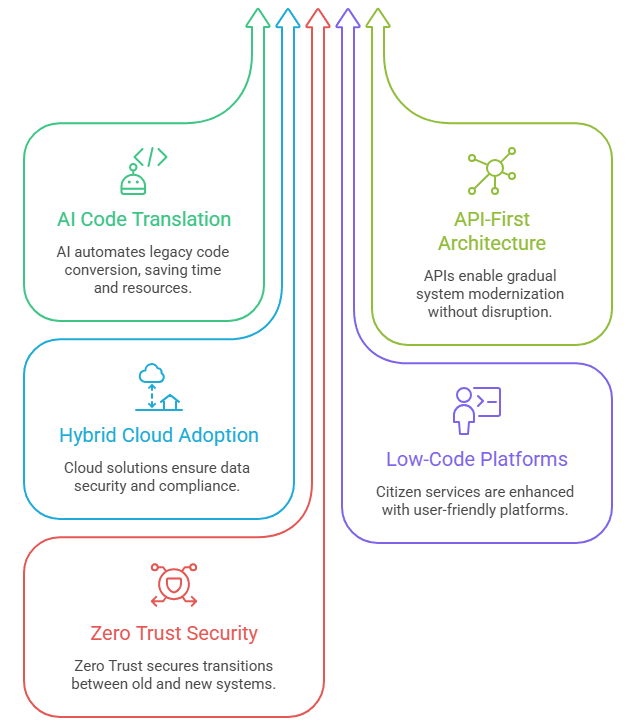
- AI-Assisted Code Translation: Large language models are now capable of reading legacy COBOL or PL/I code and generating modern equivalents in Java or Python, dramatically cutting the manual reverse-engineering effort that used to take years.
- API-First “Strangler Fig” Architecture: Rather than replacing a legacy system outright, agencies wrap it in APIs and gradually redirect traffic to new microservices, retiring the old system piece by piece instead of all at once.
- Hybrid and Sovereign Cloud Adoption: FedRAMP-authorized cloud environments (AWS GovCloud, Azure Government, Google Distributed Cloud) now allow agencies to migrate sensitive workloads without compromising data sovereignty or compliance posture.
- Low-Code/No-Code Platforms for Citizen Services: Agencies are building citizen-facing portals on low-code platforms, decoupling the “front door” experience from the aging backend systems that still process the actual transactions.
- Zero Trust as a Modernization Enabler: Rather than being treated purely as a security mandate, Zero Trust architecture is increasingly used as the connective tissue that lets old and new systems talk to each other securely during transition periods.
Solving the Problem: A Step-by-Step Modernization Framework
Successful federal modernization efforts tend to follow a similar pattern, regardless of agency size or mission. Here’s a practical, phased approach:
Step 1: Application Portfolio Assessment
Before touching any code, map every application by business criticality, technical risk, and interdependencies. This produces a clear picture of what to modernize first, what to leave alone, and what to retire entirely.
Step 2: Choose the Right Modernization Pattern
Not every system needs the same treatment. Common patterns include:
| Pattern | Best For | Risk Level |
|---|---|---|
| Rehost ("lift and shift") | Systems needing quick cloud migration with minimal code change. | Low |
| Replatform | Systems that can benefit from cloud-native features without full rewrite. | Medium |
| Refactor/Re-architect | Core mission systems needing long-term scalability. | Medium-High |
| Rebuild | Systems too outdated or undocumented to safely modify. | High |
| Retire | Redundant or unused systems. | Low |
Step 3: Build the API Layer First
Before decommissioning anything, expose legacy functionality through modern APIs. This lets new applications and services consume legacy data without agencies needing to fully replace the underlying system on day one.
Step 4: Migrate Incrementally, Validate Continuously
Move workloads in small, testable batches never a single “big bang” cutover. Run legacy and modern systems in parallel, comparing outputs to catch discrepancies before they reach production.
Step 5: Automate Testing and Compliance Checks
Manual regression testing doesn’t scale for federal-grade systems. Automated testing pipelines, paired with continuous compliance monitoring against NIST and FedRAMP controls, catch issues early and speed up Authority to Operate (ATO) approvals.
Step 6: Train and Transition the Workforce
Modernization isn’t just technical; it’s cultural. Agencies need parallel investment in reskilling staff on cloud-native tools while retaining legacy expertise until the transition is fully complete.
Real-World Use Cases
Case 1: Social Security Administration (SSA): SSA has been steadily modernizing decades-old COBOL systems that process retirement and disability claims. Rather than a full rewrite, the agency has used incremental refactoring paired with API layers, allowing new digital self-service tools to run alongside legacy claims processing without service interruption.
Case 2: IRS Modernization Roadmap: The IRS’s ongoing modernization strategy prioritizes retiring the oldest infrastructure first while introducing cloud-based data analytics for fraud detection, proving that even the most complex, high-stakes federal systems can modernize in phases rather than through disruptive overhauls.
Case 3: State-Level DMV Digital Transformation: Several state DMV agencies have adopted low-code citizen portals in front of legacy record systems, cutting license renewal processing time significantly while leaving core databases untouched during the transition period.
These examples share a common thread: modernization succeeds when it’s incremental, API-driven, and validated at every stage, not when it’s treated as a single, high-risk event.
Best Practices & Expert Recommendations
- Start with the data, not the code: Understanding data flows and dependencies prevents costly surprises mid-migration.
- Treat compliance as a design input, not an afterthought: Building FedRAMP and Zero Trust requirements into architecture from day one avoids expensive rework later.
- Run new and old systems in parallel during transition: Parallel operation is the single most effective way to prevent service disruption.
- Invest in a strong partner ecosystem: Agencies rarely have all the specialized modernization skills in-house; experienced federal IT modernization services providers can accelerate timelines while reducing risk.
- Modernize incrementally with clear milestones: Break large programs into 90-day increments tied to measurable outcomes, which also aligns better with federal budget cycles.
Common Mistakes to Avoid
Attempting a full replacement without a phased plan: This is the single biggest cause of failed federal IT projects.
Underestimating legacy interdependencies: Many outages happen because a “minor” system turns out to be feeding data into five other critical applications.
Delaying cloud migration due to compliance fears: Modern federal cloud migration consulting partners can navigate FedRAMP and ATO processes far faster than agencies attempting it alone.
Ignoring workforce readiness: Even the best architecture fails if staff aren’t trained to operate and maintain it.
Underestimating app modernization challenges in the public sector, such as procurement delays, legacy vendor lock-in, and inconsistent data standards across departments, all of which require dedicated change management, not just technical fixes.
Conclusion: The Future of Government IT Talent Belongs to Bold Agencies
Federal legacy modernization is no longer a question of whether; it’s a question of how fast and how safely. The agencies succeeding today are the ones treating modernization as a continuous, incremental discipline rather than a one-time project. Expect the next few years to bring deeper AI-assisted code migration, wider adoption of Zero Trust as a modernization backbone, and increasing use of government technology trends like sovereign cloud and low-code citizen services to bridge the gap between legacy reliability and modern user experience.
Agencies that get this right won’t just avoid outages; they’ll deliver the fast, secure, citizen-centric services the public increasingly expects from government.
App Maisters Government partners with federal, state, and local agencies to modernize legacy systems without disrupting mission-critical operations combining deep public-sector compliance expertise with modern cloud, AI, and automation capabilities.
Frequently Asked Questions
How much does it cost to modernize legacy federal IT systems?
Costs vary widely by agency and system complexity, but federal agencies collectively spend the majority of their IT budgets often cited around 80% just maintaining legacy systems rather than upgrading them. Modernization costs depend on the chosen pattern (rehost vs. full rebuild), with incremental approaches typically costing less upfront but requiring sustained multi-year investment.
Can federal agencies migrate to the cloud without violating FedRAMP or FISMA requirements?
Yes. FedRAMP-authorized environments like AWS GovCloud and Azure Government are specifically built to meet FISMA and NIST 800-53 requirements, allowing agencies to migrate sensitive workloads while maintaining compliance. The key is building compliance into the architecture from the start rather than retrofitting it later.
What is the biggest risk in legacy system modernization for government agencies?
The biggest risk is attempting a full “big bang” replacement instead of a phased migration. Undocumented dependencies in decades-old systems often mean a seemingly minor application is quietly feeding data into several other critical systems, causing cascading failures if changed too quickly.
How long does it typically take to modernize a legacy government system?
Timelines vary by scope, but most successful federal modernization programs run in phased increments (often 90-day cycles) over several years rather than as a single project. This aligns with federal budget appropriation cycles and allows continuous validation at each stage.
Can AI actually help rewrite old COBOL or mainframe code?
Increasingly, yes. AI-assisted code translation tools can read legacy COBOL or PL/I code and generate modern equivalents in languages like Java or Python, significantly reducing the manual reverse-engineering effort that historically took years and required increasingly scarce COBOL specialists.
How do agencies modernize systems without causing downtime or service disruption?
The standard approach is running legacy and modernized systems in parallel during transition, using API layers to gradually redirect traffic (“strangler fig” pattern) rather than shutting down and replacing systems all at once. This lets agencies validate new systems against old outputs before fully retiring legacy infrastructure.