How to Pick the Right Archiving Solution for Public Records Requirements
Government agencies handle vast flows of emails, messages and documents every day many of which are public records subject to transparency laws. For example, in FY2023 federal agencies received over 1.1 million FOIA requests (a 30% jump over the prior year), underscoring the scale of compliance work. Automated public records archiving systems capture every official communication (email, chat, social media posts, etc.) and keep it searchable. This means records officers can respond to audits and FOIA inquiries quickly and confidently, rather than digging through personal devices or manual files. In short, archiving is now an essential part of modern government records management software.
Understanding Public Records Requirements
Government archives must meet strict regulations. Key laws include the Freedom of Information Act (FOIA), Sunshine and open‐records laws, the Federal Records Act, and NARA retention rules. For instance, FOIA mandates that agencies “preserve and produce official communications upon request across every channel they use”. FOIA guidelines require a response within 20 business days. Likewise, every U.S. state has its own open‑records law obligating local agencies to retain and release public information. The U.S. National Archives (NARA) provides detailed guidance on managing federal records over their lifecycle.
- FOIA & Open Records: Agencies must archive all official communications so they can meet FOIA deadlines and state transparency laws.
- Retention Schedules: Federal rules (and many state laws) define how long different records must be kept. Good archiving software supports automated retention schedules, deleting or transferring records when their legal term expires.
- Audit & Liability: Proper archiving creates tamper-proof audit trails. This protects the agency in litigation and reduces legal penalties for non-compliance.
Together, these requirements make archiving not just a policy choice but a legal necessity. A unified archive “demonstrates compliance with FOIA and state public records laws while keeping operations efficient”, and it also “strengthens public trust by proving that records are handled responsibly and consistently”.
Core Features to Look For
The right solution should go beyond simple data storage. Look for these features in public records archiving platforms:
- Comprehensive Capture: Archiving software must ingest every communications channel your agency uses. That means email, mobile SMS, chat and collaboration apps (Teams, Slack, etc.), plus social media (Facebook, Twitter, Instagram) and even public website content. By centralizing all channels, records officers can quickly search across email, text, social posts, etc.
- Search and Retrieval: A high-performance index and advanced search are critical. The system should support full-text search, metadata filters, and bulk exports. For example, Jatheon’s solution can search millions of records in under a second using dozens of criteria. Fast, flexible search lets you respond to FOIA requests with “blazing fast advanced search” and targeted redaction.
- Automation & Classification: Automated workflows reduce manual effort and error. The best systems automatically capture communications in real time (even if messages are edited or deleted). AI-driven categorization can tag and index records, making them easier to find. As one report notes, “harnessing AI for automated categorization and retrieval can revolutionize how you manage public records”.
- Security & Compliance: Data must be secure at rest and in transit. Look for strong encryption, role-based access controls, multi-factor authentication, and full audit trails. Some solutions even use blockchain to ensure immutability: “Blockchain technology provides an immutable, tamper-proof way to preserve data integrity”. Compliance features like legal holds, PII redaction, and records locks are a must for FOIA and litigation support.
- Retention and Deletion: Your archiving tool should enforce retention policies automatically. When a record’s retention period expires, the system can flag or purge it according to your rules. This helps meet NARA Capstone guidelines and other disposal requirements.
- Scalability and Redundancy: Whether on-premise or cloud, the solution must handle growing data volumes. It should offer redundant, multi-location storage to prevent data loss and ensure disaster recovery. Many agencies prefer cloud deployments for elasticity and cost efficiency, but on-premises options remain popular for sensitive data.
In short, the archiving platform should be a fully compliant records management system: an integrated part of your records workflow. It should align with government records management software standards and support the strict oversight requirements of the public sector.
Deployment: Cloud vs. On-Premises
Archiving solutions come in cloud, on-premises, or hybrid models. Consider trade-offs:
- Cloud Archives: Cloud (SaaS) solutions are highly scalable and accessible anywhere. They reduce capital costs and maintenance and often come to FedRAMP-authorized for government use. Agencies can “quickly scale storage capacity and resources” in the cloud without heavy hardware investment. Cloud archives also update automatically with new features and compliance rules.
- On-Premises Archives: On-prem solutions give agencies total control of their data and environment. They can be locked down behind agency firewalls and customized for specific security policies. For very sensitive records or high-security needs, on-prem archives can be preferable. According to market analysis, on-prem deployments often attract agencies requiring “enhanced control, security, and compliance”.
- Hybrid Approaches: Many government organizations use a mix: core archived data on-prem and a secure cloud tier for redundancy or non-sensitive content. This hybrid model can combine the best of both worlds, as long as the solution seamlessly integrates both modes.
Choosing the right deployment depends on agency policy, budget, and regulatory factors. Keep in mind that government digital service strategies increasingly favor cloud as part of broad digital transformation, but always ensure any cloud vendor meets federal security certifications.
Security and Compliance Considerations
Because archived records can contain confidential or sensitive data, security is paramount. Effective solutions are built secure by design:
- Encryption and Access Controls: All archives should use strong encryption (AES-256 or equivalent) for data at rest and TLS for data in transit. Multi-factor authentication and granular permissions ensure that only authorized personnel can retrieve records.
- Audit Trails: The system must log every action (who accessed what, when, and why) to provide an audit trail for compliance audits or investigations. These immutable logs are part of demonstrating chain-of-custody during FOIA or legal holds.
- Regulatory Standards: Confirm the solution supports relevant standards and certifications. Federal agencies often require FedRAMP authorization or compliance with NIST guidelines. Other agencies may have HIPAA, CJIS, or CJIL certification needs. The vendor should clearly document how their archive meets these regulations.
- Disaster Recovery: Ensure the provider offers robust backup and recovery processes. The risk of data loss from hardware failure, cyberattacks, or natural disasters is too high to ignore. Regular automated backups, data replication across locations, and rapid recovery plans are non-negotiable.
Poor archiving or gaps in policy can lead to big risks. For example, one analysis warns that failing to preserve required records can cause legal penalties and loss of public trust. By contrast, a well-architected archive built on current smart government technology trends (like AI-powered monitoring or blockchain locks) will simplify compliance. As Smarsh notes, a trusted archive “enables your agency to adhere to recordkeeping requirements” (like FOIA) and handle requests seamlessly. In practice, a secure archive means CIOs can rest assured communications are preserved in context and ready for any audit or lawsuit.
Selecting the Right Vendor
Not all archiving solutions are equal. When choosing a vendor or product, government IT leaders should consider:
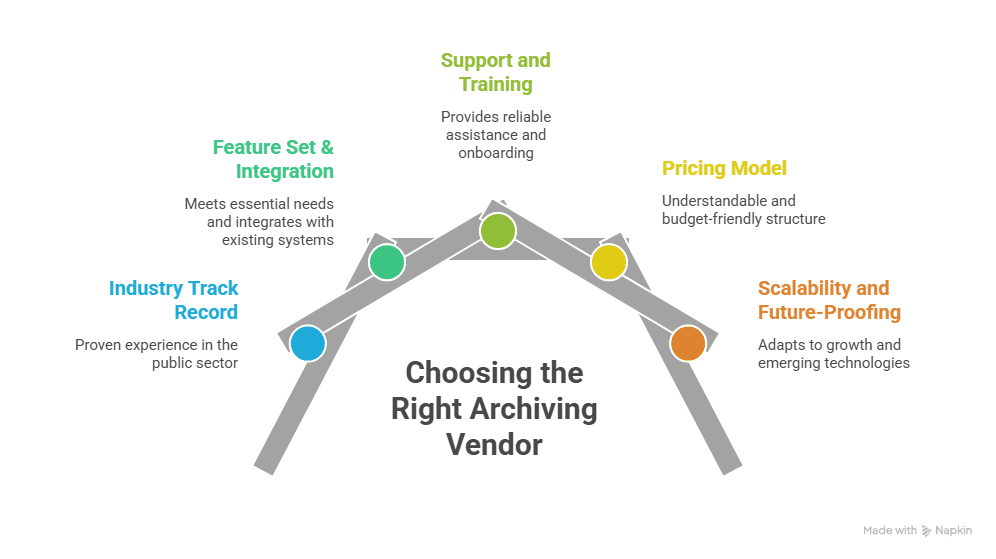
- Industry Track Record: Look for vendors with proven experience in the public sector. Trusted names often feature prominently in analyst reports (e.g. Gartner’s Magic Quadrant for Digital Communications Governance and Archiving) and have testimonials from other agencies. Many leading solutions claim high user ratings (e.g. 4.7–4.9 on industry review sites) and have serviced hundreds of government clients.
- Feature Set & Integration: The product must meet your “must have” list (channels, search, compliance) and integrate with existing systems (email servers, collaboration platforms, case management, etc.). Ask about connectors for your current IT stack. For example, Jatheon archives “email from all major platforms” and supports social and chat archives.
- Support and Training: Agencies need dependable support and training. Check if the vendor offers 24/7 assistance and onboarding help. Review whether they provide documentation, how-to guides, and dedicated account managers. Smooth implementation is critical for tight public-sector timelines.
- Pricing Model: Government budgets are finite. Understand the pricing structure (per user, per mailbox, or fixed fee). Beware of hidden costs (setup fees, overage charges for extra storage or data). Some archives offer flat-rate pricing with no surprises, which can be easier to fit into annual budgets.
- Scalability and Future-Proofing: The market is evolving. Choose a solution that can grow (number of users, data volume) and adapt to new channels (e.g. emerging social networks or collaboration tools). Verify the vendor’s roadmap (AI features, advanced analytics, etc.) to ensure the system won’t become obsolete.
By thoroughly evaluating these factors against your agency’s needs, you’ll pick a solution that fits both current demands and future growth. Ultimately, the right archiving system should feel like a natural extension of your government IT solutions, one that records communications transparently without burdening your staff.
Best Practices for Implementation
Once you’ve chosen a platform, a strategic rollout is key:
- Inventory and Planning: Begin with a records inventory. Determine what types of records and channels need archiving and what retention schedules apply. Define roles and policies (who manages the archive, how records are classified, etc.).
- Pilot Test: Run a pilot with a small department or dataset. This will expose any integration issues and help refine search categories or retention rules. Use feedback to adjust configurations before a full rollout.
- User Training: Train records officers and relevant staff on how to use the system. Emphasize best practices (e.g. tagging records, initiating e-discovery searches, requesting exports). Ensure your legal and compliance teams know how to place legal holds within the archive.
- Automate Policies: Configure retention and deletion policies in the system upfront. Wherever possible, automate record classification and aging-out of content to minimize manual tasks. Most archives support rule-based tagging and schedule-driven disposition.
- Monitoring and Audit: After go-live, routinely verify that archiving is running as expected. Check that all channels are captured and that search results are accurate. Use built-in analytics or logs to monitor usage and address any gaps.
Following these steps will smooth the adoption curve. A well-implemented archive becomes invisible day-to-day, just a reliable background service until it’s needed for a FOIA request or investigation.
Benefits and ROI
Investing in a robust archiving solution yields tangible returns:
- Time Savings: Automated search and retrieval cut response times dramatically. Instead of days spent gathering emails or messages, records can be pulled in minutes. This frees staff for mission-critical tasks.
- Cost Efficiency: Reducing manual labor (like combing inboxes) and storage costs (by aging out old data) leads to budget savings over time. Additionally, some studies suggest that well-managed data can lower overall IT costs by avoiding data bloat.
Risk Reduction: Having all records organized and backed up lowers the risk of fines, litigation costs, and reputational damage. An archive with strong retention controls helps ensure you never accidentally delete data under a hold.
- Transparency and Trust: Quick, accurate responses to public records requests enhance public trust. As noted earlier, archiving helps “document policy decisions, service commitments, and community communications” while proving accountability.
In sum, efficient public records management software for government doesn’t just protect against risk it turns compliance into a streamlined, even automated process. Agencies that embrace smart archiving report faster FOIA turnarounds and more confidence in their data governance.
Conclusion and Next Steps
Choosing the right archiving solution is a strategic decision for any public-sector IT leader. The solution must align with your government records management software needs, meet all legal obligations, and scale with future digital transformation efforts. Today’s best options integrate AI, cloud scalability, and secure repositories to handle even emerging communication channels.
If your agency is evaluating archives, remember to compare features against your unique requirements from FOIA to local records laws, from encryption standards to user experience. Explore our products to see ready-made government archiving suites designed for compliance. Contact us for a personalized demo or free consultation, and ensure your records management keeps pace with smart government technology trends while fulfilling every public records requirement.
Frequently Asked Questions
What happens if a government agency fails to archive public records?
Failure to archive records can lead to legal penalties, failed audits, and loss of public trust. A secure public records archiving solution helps agencies avoid compliance and litigation risks.
How long should government agencies retain public records?
Retention periods depend on federal, state, and local regulations. Government records management software automates retention schedules to ensure compliance.
Can public records archiving reduce FOIA response time?
Yes. Automated archiving and advanced search tools speed up record discovery. Agencies can respond to FOIA requests faster and with fewer manual resources.
Is cloud-based public records archiving safe for government use?
Yes, when built for the public sector with strong security controls. Many solutions follow NIST and FedRAMP-aligned practices to protect government data.
How do agencies modernize records management without disrupting operations?
Agencies adopt scalable public records management software for government that integrates with existing systems. This allows gradual modernization without interrupting daily workflows.
How can App Maisters help agencies meet public records requirements?
App Maisters delivers secure, compliant archiving as part of end-to-end government IT solutions. Our platforms support transparency, audit readiness, and long-term digital governance.