How Government Agencies Use Native vs. Cross-Platform Apps: Pros, Cons, and Cost
Picture this: A citizen visits a city office to renew a license. They wait 90 minutes. When they finally reach a clerk, the clerk opens a desktop app that crashes because it only works on Internet Explorer. Meanwhile, a neighboring city lets residents complete the same task in four minutes via a mobile app.
This gap isn’t fictional. It’s the daily reality across thousands of government agencies worldwide. As of 2025, 73% of government IT leaders cite fragmented mobile strategy as a top modernization barrier. The root of that fragmentation? An unresolved debate between native vs cross-platform government apps a decision that quietly shapes budgets, citizen experiences, and agency efficiency for years.
For agency CIOs, IT directors, and digital transformation leads, choosing the wrong path here means wasted millions and stalled modernization. Choosing right means governments that actually work for everyone.
Key Challenges Facing Government App Development
Before selecting a development strategy, agencies have to deal with a certain set of limitations that private-sector businesses just do not encounter:
1. Legacy System Entanglement: Most government agencies run on decades-old backend infrastructure, COBOL mainframes, on-premises databases, siloed data systems. Any new app must integrate with these, which complicates both native and cross-platform builds dramatically.
2. Multi-Platform Citizen Expectations: Government services must reach everyone. That means iOS users, Android users, and increasingly, citizens with low-end devices on limited data plans. A platform-exclusive app is a civil rights problem, not just a UX issue.
3. Cybersecurity and Compliance Requirements: FedRAMP, HIPAA, ADA compliance, and Section 508 accessibility standards create a non-negotiable technical baseline. Apps must pass security audits before going live, a process that can take 6–18 months.
4. Budget Rigidity: Government procurement cycles are notoriously inflexible. A cost overrun isn’t just embarrassing; it triggers audits, delays, and sometimes cancellation of the entire project.
These are the forces shaping every government app modernization challenge today. The choice between native and cross-platform development hits each of these pressure points differently.
What is Native and Cross-Platform.
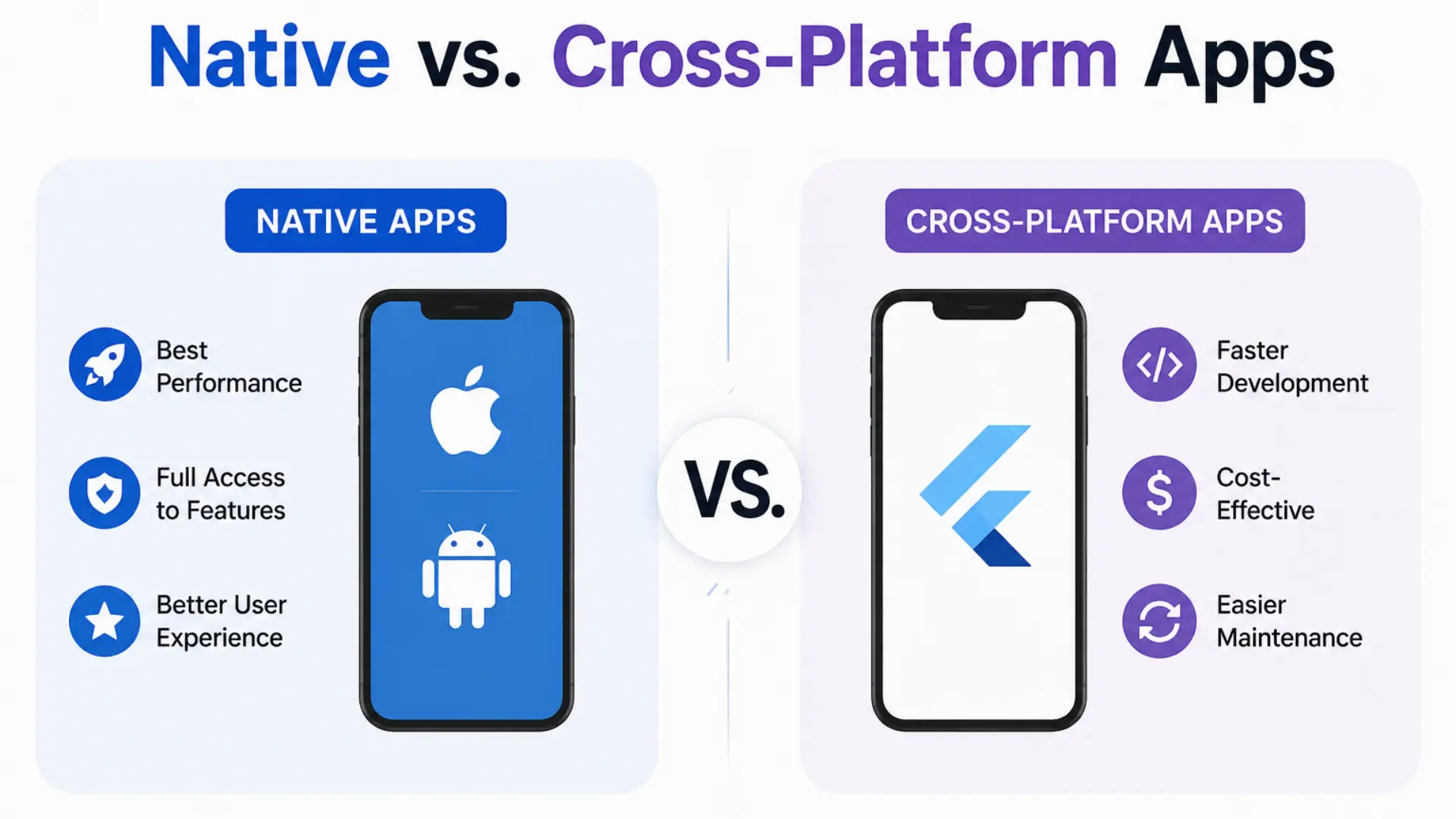
Native apps are built specifically for one operating system, either iOS (using Swift) or Android (using Kotlin) using that platform’s own tools and language. Because they’re designed exclusively for one OS, they deliver the best performance, smoothest animations, and full access to device hardware like cameras, GPS, and biometrics. The trade-off is cost: you essentially build and maintain two separate apps.
Cross-platform apps, on the other hand, are built once using frameworks like Flutter or React Native and deployed on both iOS and Android simultaneously. This saves significant time and budget since a single codebase powers both platforms. While they historically lagged behind native in performance, modern cross-platform tools have closed that gap dramatically, making them the practical choice for most government and enterprise use cases today.
The Two Paths: What You have Actually Choosing Between
| Factor | Native Apps | Cross-Platform Apps |
|---|---|---|
| Languages | Swift/Kotlin per platform | React Native, Flutter, Xamarin |
| Performance | Maximum (direct OS access) | Near-native (improving fast) |
| Development Cost | 40–70% higher (dual codebase) | Lower (single codebase) |
| Time to Market | Slower | 30–40% faster |
| Platform Features | Full access (biometrics, NFC) | Partial (improving with each release) |
| Maintenance | Two teams, two update cycles | One team, unified updates |
| UI Consistency | Platform-native feel | May feel slightly generic |
| Best For | High-security, hardware-intensive apps | Broad citizen-facing services |
Emerging Technology Trends Reshaping the Decision in 2026
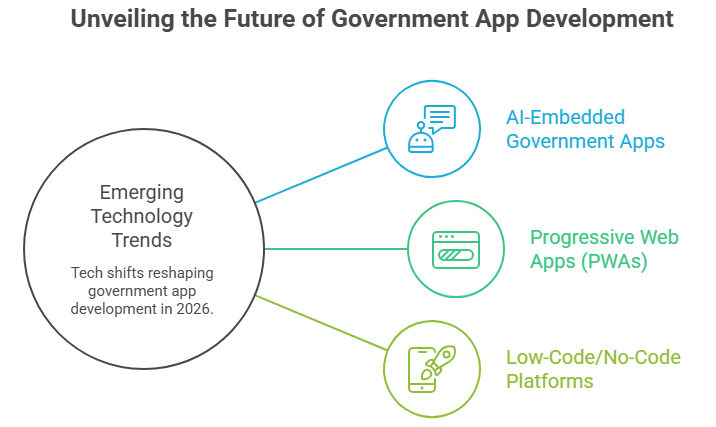
The native vs. cross-platform debate isn’t static. Three major tech shifts are actively changing the calculus:
1. AI-Embedded Government Apps
The rise of the cross-platform AI chatbot app is transforming how governments handle citizen queries. Frameworks like Flutter now support on-device AI inference, meaning agencies can deploy smart virtual assistants for permit queries, tax questions, and welfare eligibility across both iOS and Android from a single codebase, with no data leaving the device. This is critical for privacy-sensitive government use cases.
2. Progressive Web Apps (PWAs) as a Third Option
PWAs blur the line between native and web. Several European municipal governments have deployed PWA-based service portals that install like apps, work offline, and pass accessibility audits at roughly 20% of the cost of native development. They’re not ideal for hardware-intensive tasks, but for information and form-based government services, they’re increasingly compelling.
3. Low-Code/No-Code Platforms with Government Compliance Layers
Platforms like Salesforce Government Cloud, ServiceNow, and Microsoft Power Platform now ship with pre-built FedRAMP and HIPAA compliance configurations. Agencies can deploy cross-platform apps in weeks rather than years, reducing the government app modernization challenge of long procurement timelines.
Step-by-Step: How Government Agencies Should Decide
Step 1: Classify the App by Function
Start with a straightforward query: Can this application function mainly through the user interface and data, or does it require deep hardware access?
- Needs biometrics, GPS precision, Bluetooth/NFC (e.g., digital ID verification, field inspection tools)
- Primarily forms, information delivery, queue management, document uploads → Lean cross-platform
Step 2: Run a Total Cost of Ownership (TCO) Analysis
Factor in not just build cost, but:
- Maintenance over a 5-year cycle (native typically costs 1.5–2x more annually)
- Security audit costs per platform
- Staff training and developer hiring/retention
For most agencies, government app development services built on cross-platform frameworks save 35–50% over a 5-year TCO compared to parallel native builds.
Step 3: Define the Citizen Segment
On what devices and by whom will this app be used? Utilize the data that your organization already has or carry out a quick user survey. Android usually has a larger market share if your population tends to be older or poorer, which supports cross-platform.
Step 4: Pilot Before You Commit
Run a 90-day pilot on one service function. Measure load times, accessibility audit scores, citizen satisfaction, and support ticket volume. Scale only after validating real-world performance.
Step 5: Plan Compliance and Security from Day One
Don’t retrofit security. Engage your agency’s security office before a line of code is written. For cross-platform builds, verify that the chosen framework (Flutter, React Native) has documented paths to Section 508, FedRAMP, and relevant state compliance standards.
Real-World Use Cases: What's Actually Working
Case Study 1: FEMA Mobile App (Native Hybrid Approach)
FEMA’s disaster assistance app uses a native-shell approach with shared cross-platform logic. Citizens can apply for assistance, upload photos of damage, and track their case all offline-capable. The hybrid architecture lets FEMA maintain iOS/Android performance while cutting backend logic development by ~40%.
Case Study 2: Singapore's Singpass (Cross-Platform Success)
Singapore’s national digital identity app, used by 4.5 million citizens, was rebuilt on a cross-platform architecture in 2022. The result: a single team maintaining both platforms, 60% faster feature releases, and a 4.7-star average App Store rating. The app handles biometric login, digital document storage, and government service access, providing a cross-platform solution that can handle security-critical government use cases.
Case Study 3: Los Angeles DMV Queue App (Mobile Apps Reduce Office Queues)
LA’s DMV deployed a cross-platform appointment and queue management app built with React Native. Within six months, walk-in wait times dropped by 67%. Citizens receive real-time queue updates, can reschedule from their phone, and complete pre-visit form submissions digitally. This is a clear example of how mobile apps reduce office queues and reclaim hours from citizens’ days while reducing staffing pressure at physical locations.
Best Practices and Expert Recommendations
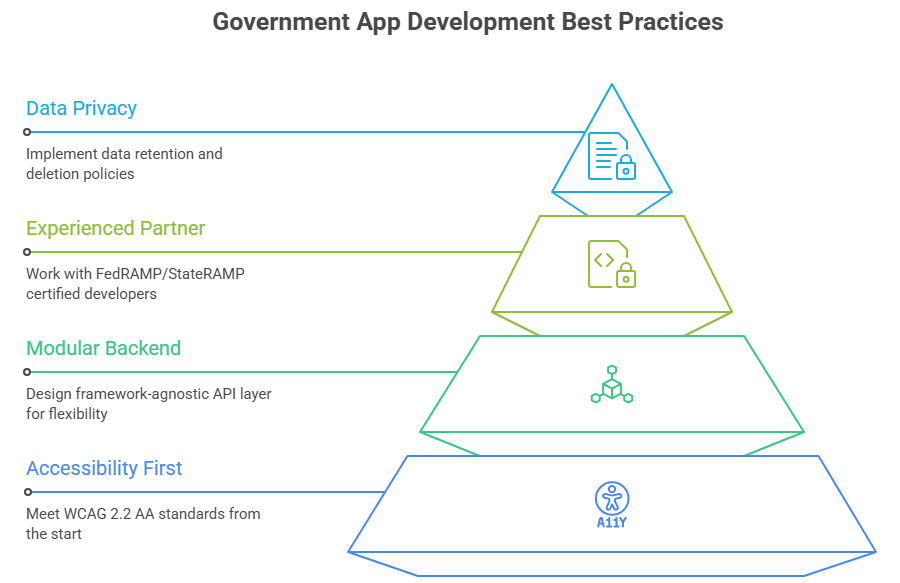
Design for Accessibility First, Not Last: Government apps must meet WCAG 2.2 AA standards. Both native and cross-platform frameworks support this, but it requires deliberate design, not an afterthought. Build accessibility testing into every sprint, not just the final QA phase.
Modularize Your Backend Logic: Whether you go native or cross-platform, design your API layer so it’s framework-agnostic. This protects your investment if you switch approaches in a future modernization cycle.
Adopt a Government App Development Partner with Public Sector Experience: Commercial developers often underestimate compliance timelines and procurement complexity. Work with partners who have active FedRAMP or StateRAMP certifications and experience navigating government procurement.
Version Control for Citizen Data Privacy: Any app collecting citizen data must have a documented data retention and deletion policy baked into the architecture from day one, not added after a privacy complaint.
Common Mistakes to Avoid
Mistake #1 Choosing Native Because It “Feels More Professional”: This is organizational politics, not technology strategy. Native apps are not inherently more secure or capable for the majority of government use cases. Cross-platform frameworks have closed the gap dramatically.
Mistake #2 Ignoring Offline Functionality: Government services are often needed most in disaster scenarios, exactly when connectivity is unreliable. Both native and cross-platform apps should be designed for offline-first data syncing.
Mistake #3 Underestimating Maintenance Costs: Agencies often budget for build costs but not for annual maintenance, OS updates, security patches, and accessibility re-audits. A cross-platform build reduces this burden significantly across the lifecycle.
Mistake #4 Building Without Citizen Input: Deploying a beautifully engineered app that citizens don’t use is a real risk. Conduct usability testing with actual constituents across age groups, languages, and device types before launch.
Conclusion: The Right Choice Is a Strategic One
There is no universal answer to the native vs. cross-platform question for government agencies. But there is a strategic answer, and it starts by being honest about your agency’s constraints, citizen base, and long-term budget reality.
For the vast majority of citizen-facing government app development services, service portals, queue management, document submission, and eligibility checking, cross-platform frameworks offer superior economics without meaningful performance trade-offs. For specialized, hardware-intensive, or high-security internal tools, native development still earns its premium.
What’s next in this space? By 2027, AI-native government apps will be the baseline expectation, not a differentiator. Citizens will expect personalized, conversational interfaces powered by cross-platform AI chatbot app technology, real-time service status, and proactive alerts. Agencies that establish their cross-platform foundation now will have the architecture to layer these capabilities in quickly. Those still managing dual native codebases will be scrambling to catch up.
The governments that serve their citizens best in the next decade won’t be the ones with the biggest budgets. They’ll be the ones who made smarter technology decisions today.
Why App Maisters Government Belongs in Your Modernization Strategy
Government agencies face a unique challenge: deliver best-in-class digital experiences under procurement constraints, compliance requirements, and legacy system realities that private companies never encounter. App Maisters Government brings deep expertise in both native and cross-platform development, with a track record of delivering government-grade apps that pass security audits, meet accessibility standards, and actually get used by citizens.
Whether you’re evaluating how native vs cross-platform government apps fit your agency’s roadmap, piloting a cross-platform AI chatbot app for citizen services, or looking to ensure your mobile apps reduce office queues measurably, App Maisters Government delivers solutions built for the realities of public sector technology, not around them.
Frequently Asked Questions
Which is better for government apps native or cross-platform?
It depends on the use case. Cross-platform is better for most citizen-facing services (portals, queues, forms) due to lower cost and faster delivery. Native is preferred for hardware-intensive or high-security internal tools like digital ID verification or field inspection apps.
How much does it cost to build a government mobile app?
A native government app typically costs $150,000–$500,000+ per platform. A cross-platform app covering both iOS and Android can range from $80,000–$250,000, making it 35–50% more cost-effective over a 5-year lifecycle.
How long does it take to develop a government app?
Native apps take 9–18 months on average when accounting for compliance and security audits. Cross-platform apps can cut that timeline by 30–40%, especially when built on pre-certified government cloud platforms.
Can cross-platform apps meet government security and compliance standards?
Yes. Modern frameworks like Flutter and React Native support FedRAMP, HIPAA, Section 508, and ADA compliance. The key is building security into the architecture from day one, not retrofitting it later.
How do mobile apps help reduce long queues in government offices?
Mobile apps allow citizens to book appointments, submit documents, and receive real-time queue updates remotely, eliminating the need for in-person visits for routine tasks. The LA DMV, for example, reduced walk-in wait times by 67% after launching a queue management app.
What is the best framework for building cross-platform government apps?
Flutter and React Native are the two leading frameworks. Flutter is increasingly preferred for government projects due to its strong performance, single codebase, and growing support for accessibility and offline functionality, both critical requirements for public sector apps.