Top 5 Website Design Trends for Municipal Governments
Municipal websites are the digital front door for local governments. They inform residents, highlight local news, and deliver essential public services. But as community expectations rise, governments must keep their sites modern, user-friendly, and efficient. In 2025, technology and operations leaders often partner with municipal website design companies to implement the latest updates. In this post, we dive into the top 5 municipal website design trends that digital leaders in local government need to know. Each trend is backed by recent data and examples from around the world.
1. Content-Centered Layouts & Powerful CMS
Strong municipal websites start with a robust Content Management System (CMS). A modern CMS lets staff easily create and update pages to match citizens’ needs. For example, one county completely overhauled its site by trimming 2,000 unwieldy pages down to 600 organized ones, then adding clear navigation menus and visual templates.
With a CMS like this in place, content becomes “actionable and user-friendly,” as experts note. These content-centric layouts use flexible modules (news, events, calendars, etc.) to highlight the most important information. They also encourage linking related pages, boosting SEO and guiding users through the site. Many municipal website design companies now emphasize a content-first approach: the homepage and menus focus on the tasks residents need rather than internal department names. In short, a well-tuned CMS is the foundation for a site that can grow and adapt with the community.
2. Citizen-Centric Navigation & UX
Today’s residents expect slick, intuitive web experiences. Municipal websites are learning from private-sector design to deliver just that. A “citizen-centric” layout asks: Who is visiting, and what do they want to do? Strong sites then feature big icons or buttons for the top tasks (like paying utilities, applying for permits, or checking council agendas). Visual cues (colored banners, icons with labels, etc.) highlight calls-to-action and important updates, guiding users to what they need.
For instance, one city redesigned its portal to include a prominent site-wide search, quick-access menus, and rotating announcement banners. It even translated key content into ten languages to serve its diverse population. These choices make the site feel more helpful and welcoming. As one UX lead put it, good navigation means “showing users the way without getting in their way”. In practice, a citizen-first approach reduces visitor confusion and support requests and keeps residents engaged with online services.
3. Mobile-First, Responsive Design
More people now browse city websites on smartphones than on desktop computers. In fact, U.S. government web traffic from mobile devices shot from about 13% in 2013 to ~54% in 2025. This means responsive design is no longer optional; it’s a must have. Websites must look great and load fast on any device phone, tablet, or laptop.
Mobile-first sites automatically resize text, buttons, and menus for smaller screens. They compress images and streamline code to speed up load times. Many cities also offer companion mobile apps or Progressive Web Apps to complement their websites. These apps let residents do things like file maintenance requests or pay bills directly from a smartphone. The push is worldwide: about 70% of countries now offer some form of mobile health service and 66% send public education updates via mobile. Governments recognize that mobile access is the new default for digital services, so they’re designing for it first.
Key takeaway: If your site isn’t fully responsive, you risk losing more than half your audience. Even small fixes like making phone numbers clickable or ensuring drop-down menus work on touch screens can dramatically improve usability. In a recent survey, 88% of residents said they trust their local government more if its website is easy to navigate on mobile devices.
4. Accessibility & Inclusive Design
A crucial trend in municipal website design is making sites accessible to everyone. Laws like the ADA require municipal websites to meet WCAG standards for accessibility. In practice, this means building sites that are navigable by screen readers, keyboard-only users, and voice-command tools. 63% of residents say accessibility features on government sites are important, and 59% think building accessible websites should be a priority. Yet many agencies are still catching up: only 13% of local officials say they feel very familiar with the new accessibility requirements
Implementing accessibility is both a legal need and a community trend. Leading sites now routinely include features like high-contrast color themes, alt-text descriptions for images, keyboard shortcuts, and captions or transcripts for videos. Multilingual content is another aspect: one county translated its entire site into 10 languages so non-English speakers could navigate services. Such inclusive design signals “we built this site for every resident.” These efforts pay off: research shows that when a site is easy to use for people with disabilities or limited English, overall trust in the government increases significantly. In other words, accessibility builds confidence among all citizens.
5. Interactive Services & Smart Features
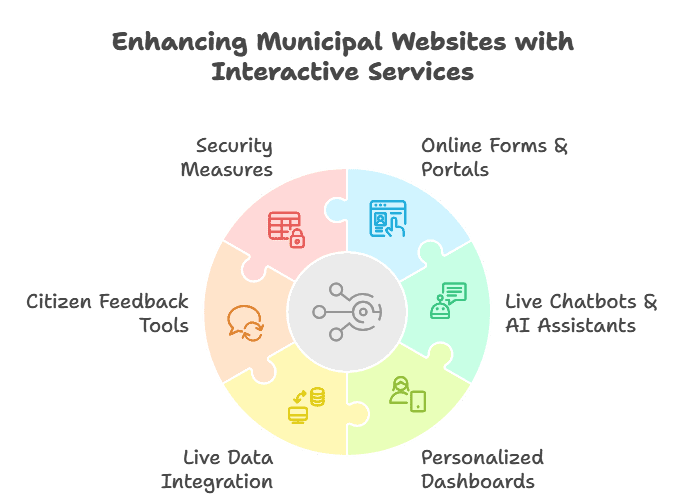
Finally, expect municipal websites to become ever more interactive service centers. Instead of just posting PDFs and documents, cities are embedding tools so residents can self-service online. Many advanced portals now integrate municipal digital services (like e-permitting or online bill pay) directly into the site. For example, an advanced city portal might include:
- Online Forms & Portals: Residents can apply for permits, pay utility bills, or register for programs directly on the site.
- Live Chatbots & AI Assistants: AI chatbots or virtual helpers answer common questions in real-time (e.g. “What are your hours?” or “How do I renew a license?”) and guide users through processes.
- Personalized Dashboards: Users see a custom homepage with alerts for their address (like garbage pickup schedules) or upcoming local events based on their interests.
These interactive elements reflect broader smart government technology trends. Some sites already pull in live data for example, showing real-time transit schedules or parking availability on the website. Gartner found that governments using AI-driven personalization (such as recommending city events or providing tailored reminders) see about a 50% boost in user engagement. Tools like surveys, community polling, and feedback forms also make the site a two-way channel, letting citizens suggest improvements or report issues right on the website.
Behind all these features, security remains critical. Agencies emphasize robust application security for government platforms, using HTTPS, firewalls, and routine audits. Even as sites get more interactive, protecting citizen data and ensuring uptime are top priorities. Work with your IT teams or vendors to follow best practices (like regular vulnerability scanning) so new capabilities don’t introduce new risks.
Conclusion
These key government website trends from CMS-driven content and citizen-focused UX to mobile-first responsiveness, universal accessibility, and interactive services are transforming how cities engage their communities. Keeping up with them helps local governments boost transparency, efficiency, and trust. In practice, that often means investing in a modern CMS, auditing content and workflows, and even partnering with a seasoned municipal website development team to implement best practices.
Every step forward helps Building Housing & Community Stronger. For example, after one county relaunched its site with a focus on UX, its mobile performance score jumped +54% and overall user engagement rose by +8%. Residents notice the difference: a site that’s easy to use and packed with self-service options translates directly into greater citizen satisfaction.
By staying on top of these government website trends, municipal technology leaders can ensure their online presence remains a 24/7 virtual town hall that truly serves its people and that’s a win for everyone.
Frequently Asked Questions
What is municipal website design?
Municipal website design focuses on creating digital platforms for cities, counties, and public agencies. It prioritizes easy access to services, clear communication, and accessibility for every resident.
Why is modern municipal website design important?
A modern site improves service delivery, reduces call volume, and builds trust. Residents find information faster and complete tasks online without visiting offices.
What features should a city website include?
Top portals include online payments, permit applications, service requests, alerts, and strong search. Mobile responsiveness and accessibility are also essential.
How often should a municipal website be redesigned?
Most governments refresh design and technology every 3–5 years. Smaller UX updates and content improvements should happen continuously.
What are the latest government website trends?
Agencies now focus on mobile-first layouts, accessibility compliance, and digital self-service tools. AI search, chat support, and personalization are growing fast.
How do municipal website design companies help governments?
They plan strategy, improve user journeys, and modernize infrastructure. They also handle integrations, compliance, and long-term scalability.
What is the role of a Content Management System in government websites?
A CMS allows staff to update pages, post alerts, and manage documents without coding. It keeps information fresh and reduces IT workload.
How can cities improve online service delivery?
Start by mapping resident needs. Then simplify navigation, digitize forms, and automate workflows across departments.
Are government websites required to meet accessibility standards?
Yes. Public agencies must follow WCAG and ADA guidance. Accessible sites serve more people and lower legal risk.
How does application security for government websites work?
Security includes encryption, user authentication, monitoring, and routine testing. These layers protect sensitive data and keep services online.
Can small municipalities afford advanced website features?
Yes. Modern platforms scale to different budgets. Phased launches and cloud solutions make upgrades manageable.
How does App Maisters support municipal digital transformation?
App Maisters helps governments modernize websites, launch secure platforms, and deliver resident-friendly experiences. Their teams focus on usability, performance, and long-term value.