
Transforming Government Websites with AI-Powered Voice Search
In an era where half of all online searches may be voice-driven by 2025, government websites must evolve to meet citizen expectations. Traditional keyword searches are giving way to AI-powered voice search, allowing users to speak their queries aloud and get immediate answers. This shift not only boosts convenience but also improves accessibility for all citizens. For example, voice recognition tools like Google’s Voice Search and Siri enable hands-free navigation, making digital services more accessible to people with mobility impairments. By adding AI-powered voice search for websites, agencies can deliver a more inclusive, engaging experience that aligns with modern user behavior.
Understanding AI-Powered Voice Search
AI-powered voice search for websites uses speech recognition and artificial intelligence (AI) to interpret spoken queries and retrieve relevant information. Instead of typing keywords, a user simply asks a question (e.g. “When is the next city council meeting?”), and the AI assistant searches the site content to provide a concise answer. This technology relies on advanced AI models and Natural Language Processing (NLP) to handle conversational, natural language queries. For instance, platforms like Polimorphic AI use machine learning to process voice commands in multiple languages, delivering spoken answers drawn from municipal data sources. Such systems often combine voice recognition with a search interface and chat capabilities, effectively turning a static website into an interactive, voice-enabled service.
Because voice queries tend to be longer and more conversational than text searches, voice search optimization is important. It means organizing website content around full questions and direct answers. Search engines and smart assistants favor content that clearly answers a query in one or two sentences, often pulled from FAQ pages or summary paragraphs. In practice, this means using long-tail keywords and question phrases (e.g. “how do I renew my driver’s license online?”) and marking up answers with schema (like FAQPage or HowTo) so AI assistants can easily find them.
Why Voice Search Matters for Government Sites
AI-powered voice search brings big benefits for public sector websites:
Enhanced Accessibility
Voice interfaces let users speak commands instead of clicking or typing. This is a game-changer for citizens with disabilities. For example, visually impaired or motor-challenged residents can navigate a site entirely by voice, reducing barriers. Agencies that implement voice-activated navigation align with accessibility standards (like WCAG and Section 508) and extend services to a wider audience. In fact, experts note that “AI features like voice search mean residents can engage with information in ways that best suit them,” making government resources more inclusive.
Improved User Experience
Modern citizens expect the same convenience from government sites as they get from Google or online shopping apps. AI voice search delivers fast, relevant answers, so users spend less time clicking through menus. By reducing frustration and simplifying search, agencies can make their content far easier to use. Government websites become more resident-friendly when information is just a voice query away. This engages citizens and builds public trust because users feel the site “understands” their needs and provides clear guidance. In short, voice search can turn static content into a responsive, conversational experience.
Operational Efficiency
AI-driven voice search can offload routine tasks from staff. When an automated assistant handles common queries 24/7, employees can focus on complex work. For example, voice AI systems can triage phone calls (replacing phone trees) or answer FAQs via chat or voice, freeing hotlines from trivial requests. In the long run, this makes government operations more efficient. Real-time AI helpers also ensure critical information (like emergency alerts) is delivered instantly to citizens when it matters most.
Broader Citizen Engagement
Offering AI-powered voice search increases the reach of digital government services. Tools that adjust to user preferences (like changing font sizes or reading text aloud) and answer questions in plain language encourage more citizens including those less tech-savvy to interact online. Governments that add citizen engagement with AI features often see higher satisfaction, as people get answers in their preferred way. In emergencies, voice systems can guide residents to up-to-date resources immediately, making public communication more resilient.
Ultimately, using AI-powered voice search on accessible government websites helps bridge the digital divide. It provides an alternate interface for those who struggle with traditional navigation or reading dense text. As one design expert observes, voice search is revolutionizing website navigation and “making digital spaces more accessible for people with mobility impairments”. This means smarter government sites serve all citizens, not just those comfortable with keyboards and menus.
Best Practices for Voice Search Optimization
Implementing voice search is only half the battle optimizing for voice queries is equally important. Here are key strategies:
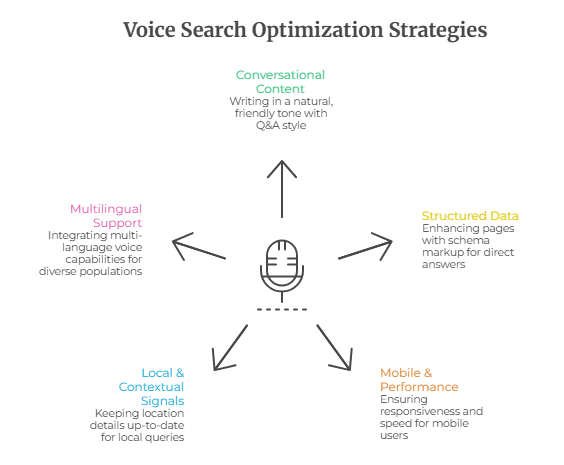
- Conversational Content: Write website copy in a natural, friendly tone. People speak differently than they type, so use question-and-answer style content. For example, instead of a terse title like “Schedule”, use a phrase like “How do I make a park reservation?” Governments should create FAQ sections with short, clear answers to common questions. This approach targets the long-tail, question-based queries that voice assistants hear. Think about intent: if a user asks “how to pay traffic ticket,” provide a step-by-step answer rather than unrelated info.
- Structured Data & Featured Snippets: Enhance pages with schema markup (especially FAQPage and HowTo schemas). This tells Google and AI platforms that your content directly answers specific questions. When a query matches, assistants can read your answer out loud. Targeting featured snippets is critical: these are often the source of voice search responses. By clearly formatting answers (using bullets, numbered steps, or short paragraphs under question headings), your site is more likely to be selected for a voice response.
- Mobile & Performance: Ensure the site is fully responsive and lightning-fast. Most voice searches happen on smartphones, so mobile optimization is a must. A slow-loading page frustrates both users and AI assistants; Google rewards quick, mobile-friendly pages. Use fast hosting, optimize images, and test regularly (Google’s Mobile-Friendly Test and PageSpeed Insights are useful tools). Also simplify site navigation (clear menus and text) so voice-controlled browsing is smooth.
- Local & Contextual Signals: Many voice queries seek local information (e.g., “Where is City Hall?” or “nearest recycling drop-off”). Keep location details up-to-date (addresses, office hours, bus routes). Maintain accurate Google My Business (or equivalent) listings. Even on government portals, ensure your contact and location info is consistent across directories and the site. Include geo-specific phrases like city name or “near me” context where relevant. For instance, a municipal site might optimize pages with terms like “waste pickup schedule [City]” if people frequently ask that.
- Multilingual and Voice UI Support: If your agency serves a multilingual population, integrate multi-language voice capabilities. Advanced voice AI can detect language and translate queries, making services accessible to non-English speakers. Also, think beyond search: add voice navigation commands (like “go back” or “main menu”) so visitors can browse hands-free. These AI accessibility features not only assist disabled users but improve UX for everyone.
By combining these tactics conversation-focused content, rich snippets, fast mobile design, and local signals government websites can become “voice-search ready.” This maximizes the chance that when citizens ask their smart assistants a civic question, your agency’s site is the one that answers clearly.
AI Accessibility Features for Government Sites
Beyond voice search, AI offers a suite of accessibility enhancements. These features help build truly inclusive government portals:
- Voice Navigation & Commands: AI-driven voice interfaces can go beyond search to full site control. Users can open specific pages or fill forms by speaking. For example, a voice UI might say “Next” or “Submit form” on command, aiding users who can’t use a mouse.
- Speech-to-Text and Text-to-Speech: Integrating text-to-speech enables web content to be read aloud. Agencies can deploy TTS so that announcements, news, or pages are narrated for the visually impaired. Conversely, speech-to-text lets users dictate input fields (e.g. search bars, comments) in their own voice. These AI features are key parts of accessible government websites, aligning with requirements like WCAG 2.1.
- Dynamic UI Personalization: AI can automatically adjust a site’s appearance. For instance, on page load, an AI system might increase font sizes or switch to a high-contrast mode if it detects a user has a screen reader or has indicated a visual impairment. This type of “smart UI” ensures each visitor gets a user interface suited to their needs. A municipal website may, for example, enlarge buttons or change colors for seniors and then revert for other users, creating a more inclusive design.
- Automated Accessibility Audits: Tools like AccessiBe or UserWay (AI-powered systems) can scan government sites to identify and fix many accessibility issues automatically. Although third-party, these AI-driven fixes can implement keyboard navigation, alt text generation, and ARIA labels with minimal manual effort. This complements voice search: while voice helps navigation, these tools improve the underlying code so that all assistive tech (including screen readers) works correctly.
- AI-Generated Captions & Language Simplification: For multimedia content, AI can auto-generate captions (using tools like AWS Transcribe or custom models), making videos accessible to the hearing-impaired. On the text side, tools like ReadEasy.AI can simplify complex government language on the fly, helping users with cognitive disabilities understand dense regulations or legal notices. These AI accessibility features aren’t about compliance alone they’re about empowering every user to grasp public information.
In summary, voice search is itself an AI accessibility feature, but it pairs with others to create a seamless experience. When government sites offer voice interfaces alongside adaptable layouts, captions, and real-time translations, they lower barriers for all citizens. Agencies that focus on such AI-driven inclusivity demonstrate their commitment to serving every demographic.
Voice interfaces and other AI tools make websites easier for everyone to use. For example, voice recognition lets users talk to the site, bypassing traditional menus. As one UX expert notes, “voice recognition tools like Google’s Voice Search and Siri… are making digital spaces more accessible for people with mobility impairments”. By adopting these AI accessibility features, governments ensure that residents can find answers by speaking or listening, not just reading. In practice, this leads to higher trust and satisfaction: every smoothly answered question builds confidence in public services.
Integrating Voice Search into Government Sites
To implement AI-powered voice search, agencies often work with expert government web development teams. Integration typically involves:
- Choosing a Voice Platform: Options range from cloud AI services (like Amazon Alexa for Government, Google Dialogflow, or Microsoft Azure Cognitive Services) to specialized public-sector solutions. For instance, Polimorphic’s platform offers a “GovAI” voice interface tailored for cities. Developers configure these tools to pull data from the site’s backend (APIs, databases, PDFs). The system listens for voice inputs, then uses Retrieval-Augmented Generation (RAG) or search algorithms to fetch the right answer.
- Optimizing the Content: The site’s Content Management Solution should allow editors to tag key information and update FAQs easily. Content is structured so that voice assistants can parse it. This might mean adding schema markup or breaking policies into clear Q&A entries. Governments that use a CMS built for accessibility and AI can make these updates quickly.
- Testing with Real Users: Voice search needs fine-tuning. Agencies conduct user testing (including people with disabilities) to ensure the voice AI understands common phrases and serves correct answers. Continuous feedback allows the system to learn user behavior and adapt (e.g. handle local accents or synonyms).
- Rolling Out in Phases: A phased deployment (piloting on a small section of the site first) helps catch issues. During rollout, analytics track voice query success rates. Developers monitor metrics like how often voice answers are accepted or clarified, then iterate for improvement.
Throughout this process, security and privacy are crucial voice data must be handled in compliance with regulations (HIPAA, CJIS, etc., where applicable). Working with experienced AI solutions for government agencies ensures these standards are met. Partnering with vendors familiar with the public sector (for example, those that hold FedRAMP or CJIS compliance) can simplify the journey.
Ultimately, adding AI-powered voice search turns a static site into an interactive portal. When combined with other tools like public sector chatbot software and robust back-end integration, it creates a 24/7 virtual assistant. This “always-on” helpdesk answers citizens promptly and accurately, improving service delivery. In fact, governments see faster response times and higher citizen engagement with these AI technologies in place.
Frequently Asked Questions
What is AI-powered voice search for websites?
AI-powered voice search for websites lets users speak their queries instead of typing. It uses speech recognition and AI (like chatbots) to interpret questions, search the site’s content, and deliver answers in real time. This makes it easy for anyone to use the website even hands-free by asking questions in natural language.
Why use voice search optimization for a government website?
Voice search optimization helps a website appear in smart assistants’ answers. By using conversational phrasing and clear, concise answers (often marked up with FAQ or HowTo schema), your content can be pulled by Google Assistant or Siri when someone asks a question. For government sites, this means residents asking about city services or permits will get a direct answer, improving user experience and accessibility.
How does voice search benefit government websites?
Voice search makes websites more accessible and user-friendly. Citizens can find information faster by simply asking for it, reducing confusion and frustration. It also helps people with disabilities or those who struggle with reading to access services. In addition, AI voice tools can relieve overloaded call centers by answering FAQs automatically, allowing staff to focus on complex issues.
What are AI accessibility features?
AI accessibility features are smart tools that remove barriers for users with disabilities. Examples include voice navigation (letting users control the site by speech), text-to-speech (reading content aloud), automatic captioning of videos, and dynamic UI adjustments (like increasing font sizes or contrast) based on user needs. These features use machine learning to adapt the site interface, making accessible government websites easier to navigate for everyone.
How can I make my website voice search friendly?
Focus on conversational keywords and question phrases that match how people speak. Write FAQs and headings that start with “how,” “what,” “where,” etc., and provide simple answers. Use schema markup (FAQPage, HowTo) so search engines can identify your answers easily. Also ensure your site is mobile-friendly and fast-loading, since most voice queries happen on phones. Regularly update content based on real voice query data to stay aligned with citizen needs.
What is the difference between text SEO and voice SEO?
Unlike text SEO (which may target short keywords), voice SEO targets long-tail, natural language queries. Voice queries often form full questions or sentences. For example, instead of optimizing for “renew driver license,” voice SEO would use “how do I renew my driver license online?”. Optimizing for featured snippets and using structured data is more critical for voice SEO, because assistants frequently read out those snippets directly.
How does voice search improve web accessibility?
Voice search allows users with visual or motor impairments to navigate and interact with websites by speaking. Integrating voice search with AI-powered CMS solutions helps government sites meet accessibility standards like Section 508 and ADA while enhancing public engagement.